
Short answer
A clinic POS is the payment part of clinic software: it builds each bill from what the doctor did in the visit, then deducts drug stock, uses course sessions and credits doctor fees as payment is taken. A retail POS rings up items without knowing the patient. Thai clinic treatment is VAT-exempt, so clinics issue receipts, never tax invoices, for it.
Key points
- A clinic bill mixes five kinds of line, and each updates something different: stock, courses or doctor fees.
- A PromptPay slip on the patient's phone proves nothing. Check the clinic's own account before marking a bill paid.
- Issuing tax invoices for treatment without the right brings tax, surcharges, penalties and a criminal fine.
- Beauty-course receipts must promise a full refund if unused within 7 days. "No refunds" clauses are not allowed.
- No POS terminal needed: a browser on a computer or tablet plus the bank's card terminal is enough.
How is a clinic POS different from a retail POS?
A retail POS knows what was sold and for how much. A clinic POS also has to know which patient the bill belongs to, which visit it came from and which doctor did what, because every payment changes three other numbers: drug stock, the sessions left on a course, and the doctor's fee.
Clinics that pair a shop POS app with paper patient cards do every bill twice: the front desk keys in the doctor's orders, ticks off course sessions in a separate book, and works out doctor fees from the bills at month end. Every copy is one more place for the numbers to disagree.
| Retail POS app | POS inside clinic software | |
|---|---|---|
| Where the bill starts | Staff key in each item | The items the doctor recorded in that visit |
| Knows the patient | Knows a member's name, not their treatment history | Tied to the patient file and that visit |
| Drugs and supplies | Deducted when rung up | Deducted as actually dispensed |
| Courses and packages | Can be sold, but sessions aren't tied to treatment | Sessions used when the patient comes in, balance always visible |
| Doctor fees | None, or a sales commission | Calculated from paid bills under each doctor's own rules |
What goes on a clinic bill, and what does each line have to update?
Five kinds of line: consultations and procedures, drugs, retail products, courses sold and course sessions used. Each has to change a different number. Before you choose software, take one real bill from your clinic and trace it line by line.
The line that most often goes missing is a course session, because no money changes hands that day. If the system only tracks money, the visit leaves no trace on a bill, and the fee owed to the doctor who did the work disappears with it.
| Line | Example | What the system must do next |
|---|---|---|
| Consultation or procedure | Consultation, filler, acupuncture, scaling | Credit the fee to the doctor who did it |
| Drugs and supplies | Take-home medicine, local anaesthetic, herbs | Deduct stock by the quantity dispensed |
| Retail product | Sunscreen, serum | Deduct stock and keep it apart from treatment revenue |
| Course sold | 10 laser sessions, 10 acupuncture sessions | Open a balance and an expiry date for the patient |
| Course session used | Third laser session | Deduct one session without charging again, and still credit the doctor |
Which payment methods should a clinic POS take, and what's the risk with PromptPay?
Four: cash, bank transfer, PromptPay and card. The system should record how many ways one bill was paid and how much each way, because expensive courses are often paid in a mix, part cash and part card, or a deposit now and the balance on the day of treatment.
The risk with PromptPay is the slip. A screenshot on the patient's phone doesn't prove the money arrived, and slips are easy to fake. Turn on incoming-payment alerts for the clinic's account and have whoever takes the money see the credit before marking the bill paid. A QR code that already carries the bill's amount also cuts wrong-amount transfers, since the patient doesn't type it.
Card payments need the bank's card terminal (EDC). If the software isn't connected to the terminal, staff record the amount and reference number on the bill and check them against the terminal's settlement slip at close.
Not proof
- A slip on the patient's phone
- An amount the patient typed in
Proof you can trust
- An incoming-payment alert on the clinic's account
- A QR code carrying the bill's amount
- Report totals that match the banking app at close
Should a Thai clinic issue tax invoices, or only receipts?
Receipts only, for treatment at a clinic licensed as a medical facility. Those services are VAT-exempt under section 81(1)(j) of the Revenue Code, so the clinic has no right to register for VAT on treatment and no right to issue tax invoices to patients.
Getting it wrong is expensive. Revenue Department ruling Kor Kor 0702/6973 of 7 September 2018 concerned a doctor who opened a clinic, registered for VAT and issued a tax invoice for every treatment. The Department found he never had the right to register, had to deregister, and was liable for the tax shown on those invoices that he had underpaid, plus surcharges, penalties and a criminal fine for issuing them.
In practice, if a shop POS app is set to print abbreviated tax invoices, switch that off and title the document as a receipt.
What isn't exempt is selling things that aren't treatment, such as cosmetics or supplements sold over the counter. If that revenue reaches the registration threshold, the clinic must register for VAT on that part. A clinic POS should therefore separate treatment from retail lines from day one, so the accountant can split the two without going through every bill.
What must a beauty-course receipt say under Thai consumer law?
Eight items, in Thai, handed over as soon as payment is taken, for any beauty course the customer uses over a number of sessions or a set period. The rule comes from the Contract Committee's 2020 notice making beauty services a business whose receipts are controlled. It covers services for cleanliness, appearance, skin care, weight control and body shape, and excludes cosmetic surgery, liposuction, rehabilitation and treatment of illness by licensed practitioners.
Letters must be at least 2 mm high, and the receipt must show:
- The clinic's name and address
- The name of the person authorised to issue the receipt
- The customer's name and address
- The start and end dates of the course or membership
- The amount paid
- A statement that if the customer hasn't used the service within 7 days of paying, the clinic refunds in full (a credit-card fee may be deducted)
- A statement that the clinic refunds the unused share if it closes, renovates or moves somewhere the customer can't reasonably reach, can't deliver what was agreed, or the customer has a doctor's certificate that continuing could cause harm
- The signature of the clinic or the authorised issuer, and of the person who took the money
- that every course receipt must show
- 8 items
- unused after payment means a full refund
- 7 days
- minimum letter height, in Thai
- 2 mm
Which course-receipt wording is not allowed?
Any wording that strips the customer's rights one-sidedly. The same notice bans wording to the effect that money is never refunded, that the customer may not cancel, that the clinic may change the service or the price on its own, or that the customer is bound by clinic rules they never agreed to. The familiar "no refunds under any circumstances" line at the foot of a course receipt cannot be used for courses the notice covers.
The Consumer Protection Board has since also made beauty services a contract-controlled business, with a standard course contract. Which of your services fall under which notice, and which version is in force, is a question for the OCPB hotline on 1166 or a lawyer before you print new receipt or contract forms.
What should a clinic check when it closes each day?
Check that what the system says came in through each channel matches the money actually there. Work through it in this order.
If the numbers don't match, start with bills split across several methods and bills edited after payment. Those two groups are where mismatches usually come from.
- Cash: count the drawer, take out the opening float, and compare with the day's cash total
- Transfers and PromptPay: compare the totals with the credits in the clinic's banking app
- Card: compare with the terminal's settlement slip
- Voids and refunds: check who made them and that each carries a reason
- Outstanding balances: see which patients haven't paid in full, and arrange the rest
Does a clinic need POS hardware or a receipt printer?
No POS terminal is needed. Cloud clinic software runs on any computer or tablet with a browser, and the card terminal comes from the bank you already use. Before buying a printer, check which receipt formats the software can print.
A4 receipts suit expensive course bills and bills patients claim on insurance, since there's room for long item lists and signatures. An 80 mm or 58 mm receipt-roll printer, the kind shops use, suits clinics whose bills are short and whose patients queue to pay.
How does SyncEdge Clinic handle the front counter, and what can't it do yet?
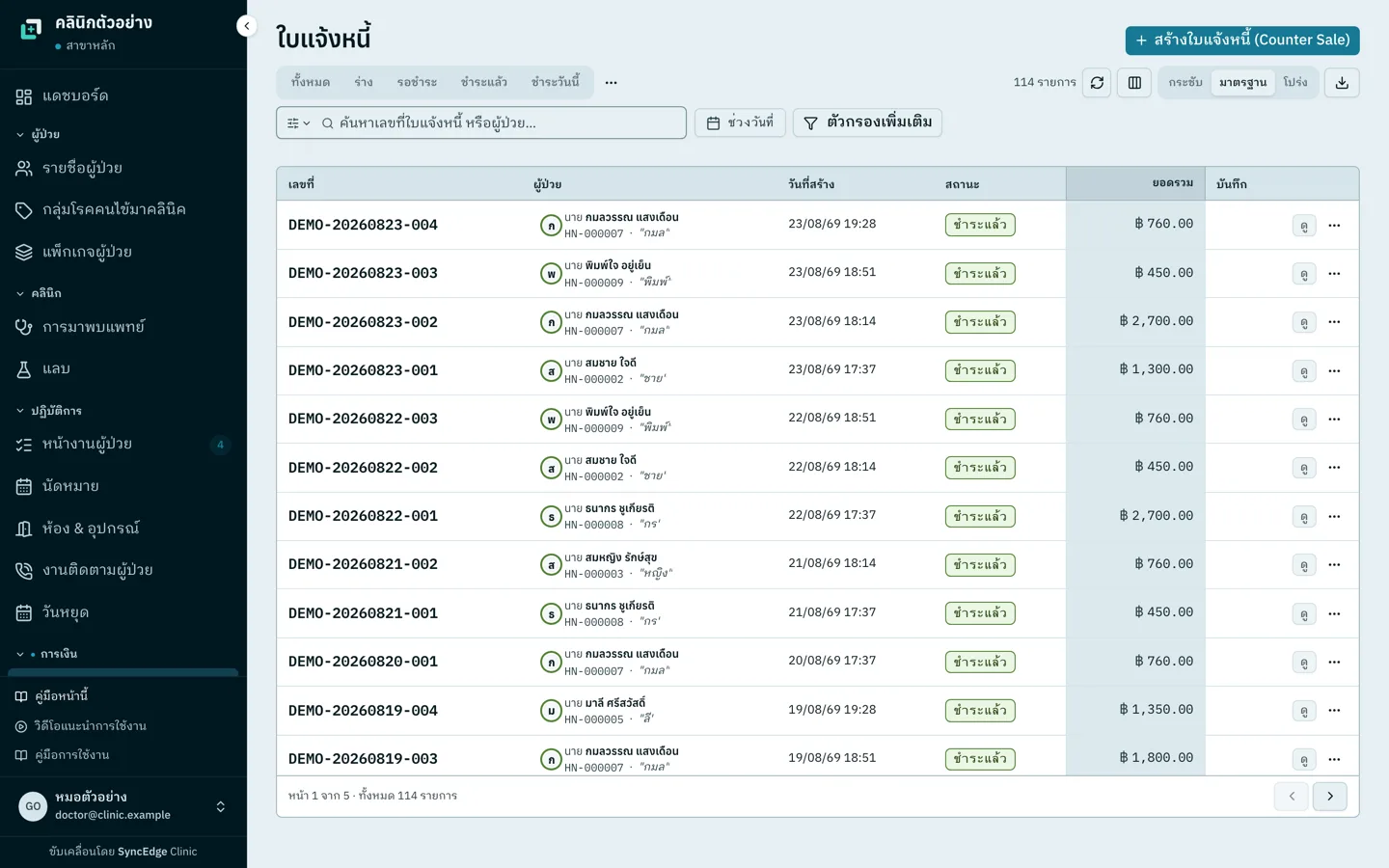
When the doctor completes a visit, the bill is built from what was recorded in that visit: services, drugs, herbs, products and courses. The front desk doesn't key anything in again. Walk-in purchases of products or courses go through the counter-sale screen. Drugs and products are deducted from stock when the visit is completed or the bill is paid, a course session deducts the supplies it uses, and a refund puts stock back.
It takes cash with change worked out, card, PromptPay, bank transfer and credit the patient has topped up. One bill can be split across methods; an unpaid remainder leaves the bill partly paid with the balance outstanding. Bills without VAT can be set up as instalments with a deposit. Discounts go on a line or the whole bill, each branch sets a discount ceiling, and going over it needs the owner.
Receipts are numbered automatically per branch and month, and carry the clinic's logo, address, tax ID and licence number, in Thai, English or both. VAT-exempt services print the section 81 note. A full tax invoice is issued only when the clinic is set up as VAT-registered and the bill carries VAT; abbreviated tax invoices are not issued at all. Receipts print on A4 or on an 80 mm or 58 mm roll printer through the browser, or download as PDF.
Reception staff can create bills and take payment but cannot void or refund; that takes a manager or the accounts role, refunds above the branch's limit need the owner, and every void, refund or reversal is kept in the bill's history. At close, the daily revenue report totals takings by payment method and by doctor, shows who received each bill, and exports to CSV, Excel or PDF.
A course sold on a bill is on the patient's file at once, with sessions remaining, used when the patient comes in, and reports for outstanding and soon-to-expire courses. Doctor fees are calculated from paid bills under each doctor's rules, including course sessions, and reversed on refund.
Five things it can't do yet. It doesn't generate a PromptPay QR or confirm that money arrived: clinics use their own QR, check the banking app and record the payment as PromptPay. It doesn't connect to card terminals or cash drawers, and doesn't scan product barcodes at the till. There's no shift-close or drawer-close screen, so the cash count follows the steps in the section above. It can't send receipts to patients by LINE or email; print them or send the PDF yourself. And receipts can't yet print a course's start and end dates or the refund statements the consumer-protection notice requires, and print the patient's address only on tax invoices, so clinics selling courses that fall under the notice need to hand over a separate sheet with that wording.
Everything in this section is in every plan from Solo at ฿990 a month, VAT included. Accounting export to PEAK, FlowAccount or Express starts on Starter at ฿2,490 a month.
Questions to ask before choosing a clinic POS
- Is the bill built from what the doctor recorded, or does the front desk key it in again?
- Can one bill be split across methods, take a deposit and carry an outstanding balance?
- Does it generate a PromptPay QR with the amount, or only record that PromptPay was used?
- When a course session is used, can you see the balance and expiry date?
- Are doctor fees calculated automatically from paid bills, including course sessions?
- Can the document be titled a receipt, with no tax invoice for VAT-exempt services?
- Can a beauty-course receipt carry the refund statements the consumer-protection notice requires?
- Who can void a bill or issue a refund, and is there a trail?
- Which paper sizes can receipts print on, and can they be sent as PDF?
Frequently asked questions
What is a clinic POS system?
A clinic POS is the front-counter payment part of clinic software. It builds the bill from what the doctor did in that visit, then deducts drug stock, uses course sessions and calculates doctor fees as payment is taken. A retail POS can't do that, because staff key in every item and it never sees the patient's treatment.
Can a clinic use a retail POS app?
It can, if the clinic mostly sells products and accepts double entry: every bill has to be keyed in from the doctor's orders, course sessions tracked somewhere else, and doctor fees worked out by hand at month end. If the app prints tax invoices, switch that off, because a VAT-exempt clinic may not issue them.
Can a Thai clinic issue tax invoices to patients?
Treatment at a licensed clinic is VAT-exempt under section 81(1)(j) of the Revenue Code, so the clinic issues receipts only. Revenue Department ruling Kor Kor 0702/6973 (7 September 2018) found that a doctor who registered for VAT and issued tax invoices for treatment had to deregister and was liable for the tax, surcharges, penalties and a criminal fine. Sales of products that aren't treatment are not exempt.
If a customer cancels a beauty course, does the clinic have to refund?
For a course covered by the Contract Committee's 2020 notice, if the customer hasn't used the service within 7 days of paying, the clinic refunds in full, less any credit-card fee. If the clinic closes, moves or can't deliver what was agreed, it refunds the unused share. A "no refunds under any circumstances" clause is not allowed. The notice excludes cosmetic surgery, liposuction and treatment of illness.
How do you know a PromptPay payment actually arrived?
Check the clinic's own account. A slip on the patient's phone proves nothing, since slips are easy to fake. Turn on incoming-payment alerts for the clinic's account and have whoever takes the money see the credit before marking the bill paid. At close, compare the report's PromptPay and transfer totals with the credits in the banking app again.
Does a clinic need a receipt-roll printer?
No. A4 receipts from an ordinary office printer work, and suit course bills and insurance claims. An 80 mm or 58 mm roll printer suits clinics with short bills and a queue at the till. SyncEdge Clinic prints both through the browser, and receipts also download as PDF.
Is there free clinic POS software?
Yes, but ask exactly what is free, whether receipts are issued in the clinic's name, and where patient data is stored. SyncEdge Clinic has no free plan. Payments, receipts, courses and the daily revenue report are in every plan from Solo at ฿990 a month, VAT included, with a 2-month free trial and no credit card needed.